AI Integration · Engineering
Multi-Agent Orchestration with Claude Agent SDK and MCP: A Production Architecture Guide
How we built production multi-agent systems using Claude Agent SDK and Model Context Protocol. Covers orchestrator-worker patterns, handoff strategies, error handling, and real-world architecture decisions.

Anurag Verma
15 min read

Sponsored
We had a problem. Our internal tooling team was drowning in support tickets: code review requests, infrastructure provisioning, documentation updates, security audit follow-ups. Each task required a different context, different tools, and different expertise. A single AI agent couldn’t handle the breadth. Giving one agent access to every tool created a confused, unreliable system that hallucinated tool calls and lost track of its own goals.
So we built a multi-agent system. Not the “let’s throw five agents in a room and hope for the best” kind. A deliberate, production-grade orchestration layer using Anthropic’s Claude Agent SDK and the Model Context Protocol (MCP) for tool integration. This post documents the architecture, the decisions we made, the tradeoffs we accepted, and the patterns that survived contact with production traffic.
Why Multi-Agent? The Single-Agent Ceiling
Before going multi-agent, we tried the obvious approach: one powerful agent with a massive tool set. Here’s what happened.
| Problem | Symptom | Root Cause |
|---|---|---|
| Tool confusion | Agent calls wrong tool for the task | Too many tools in context dilute selection accuracy |
| Context overflow | Agent forgets earlier conversation steps | Single context window shared across all concerns |
| Blast radius | One bad tool call affects entire workflow | No isolation between task domains |
| Latency | 30+ second response times | Model evaluates all tools on every turn |
| Debugging | Impossible to trace failures | Single monolithic execution trace |
The turning point was a Monday morning when our single agent, asked to review a pull request, instead tried to provision a new Kubernetes namespace. It had the tools for both. It picked wrong. That’s when we knew: specialization isn’t optional. It’s a reliability requirement.
The Claude Agent SDK Architecture
The Agent SDK gives you four core primitives that map cleanly onto production orchestration needs.
┌─────────────────────────────────────────────────────────┐
│                    RUNNER                                │
│  (Execution loop: sends messages, processes responses)  │
├─────────────────────────────────────────────────────────┤
│                                                         │
│  ┌─────────────┐   ┌─────────────┐   ┌──────────────┐ │
│  │   AGENT A    │──▶│   AGENT B    │──▶│   AGENT C    │ │
│  │ (Orchestrator)│   │  (Code Rev)  │   │  (Infra)     │ │
│  │              │   │              │   │              │ │
│  │ instructions │   │ instructions │   │ instructions │ │
│  │ model_config │   │ model_config │   │ model_config │ │
│  │ handoffs[ ]  │   │ tools[ ]     │   │ tools[ ]     │ │
│  │ guardrails[] │   │ guardrails[] │   │ guardrails[] │ │
│  └─────────────┘   └─────────────┘   └──────────────┘ │
│                                                         │
│  ┌─────────────────────────────────────────────────────┐│
│  │                  GUARDRAILS                          ││
│  │  (Input/output validation, content filtering)       ││
│  └─────────────────────────────────────────────────────┘│
└─────────────────────────────────────────────────────────┘
Each Agent is a self-contained unit with its own system instructions, model configuration, tool set, and handoff targets. The Runner manages the execution loop. It sends messages to the active agent, processes tool calls, handles handoffs, and enforces guardrails. This separation is crucial: agents define what to do, the runner defines how to execute.
Here’s a minimal agent definition:
from agents import Agent, Runner, handoff, tool

@tool
def search_codebase(query: str, file_pattern: str = "**/*") -> str:
    """Search the codebase for files matching a pattern and content query."""
    # Implementation: calls ripgrep or similar
    results = run_code_search(query, file_pattern)
    return format_search_results(results)

@tool
def post_review_comment(pr_number: int, file: str, line: int, body: str) -> str:
    """Post an inline review comment on a pull request."""
    return github_client.post_review_comment(pr_number, file, line, body)

code_review_agent = Agent(
    name="Code Review Agent",
    instructions="""You are a senior code reviewer. You review pull requests
    for correctness, security issues, performance problems, and style.

    Always search the codebase for related code before commenting.
    Never approve PRs with unhandled error paths.
    Be specific — reference exact line numbers and suggest fixes.""",
    tools=[search_codebase, post_review_comment],
    model="claude-sonnet-4-20250514",
)
Notice what’s not here: no workflow definition, no state machine, no DAG. The Agent SDK is deliberately low-level. You compose behavior through agent instructions, tool design, and handoff topology, not through a framework-imposed execution graph.
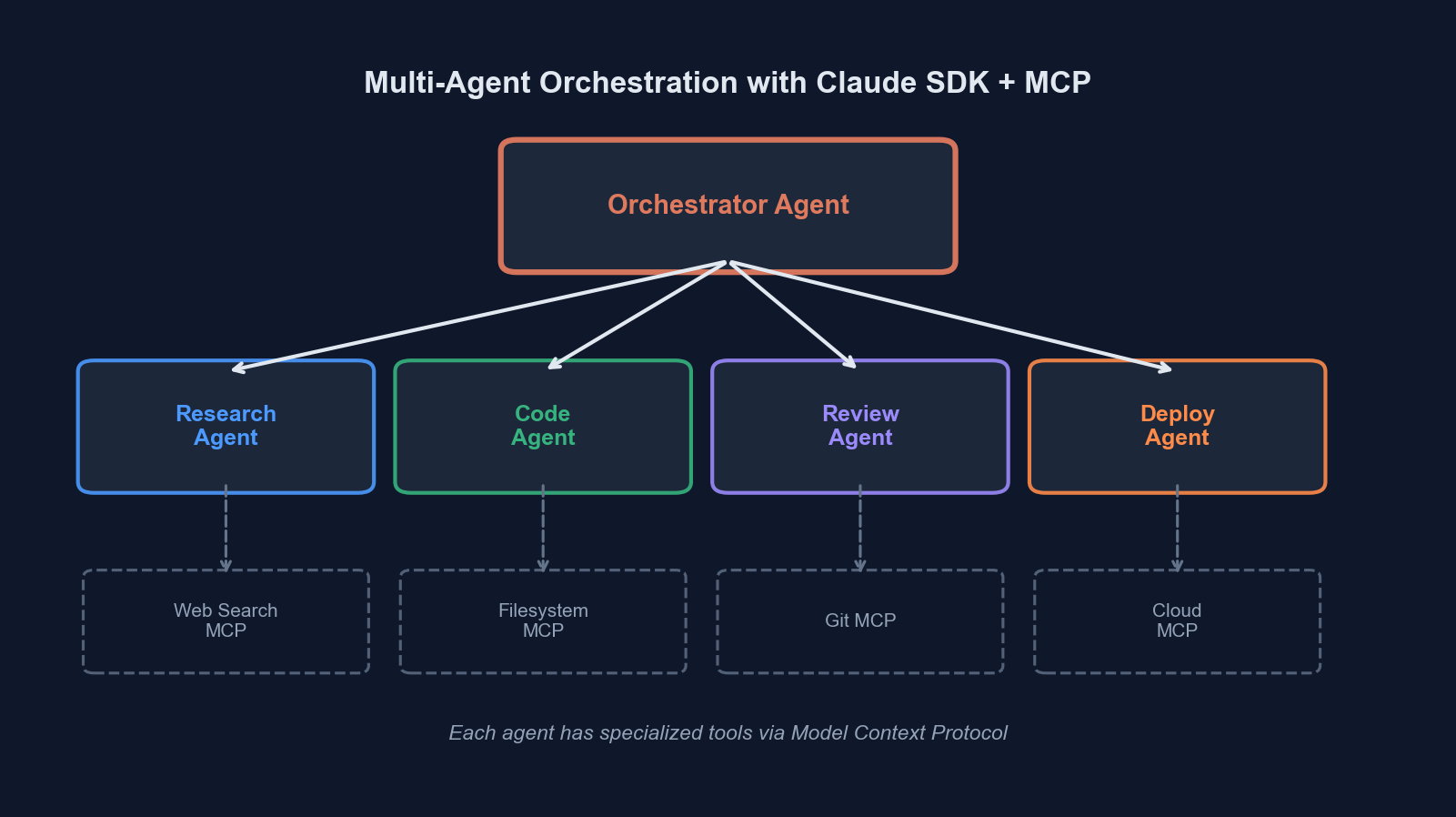 Orchestrator-worker topology: the orchestrator routes tasks to specialized agents, each with their own tool set and context
MCP: The Tool Integration Layer
Here’s where most multi-agent tutorials hand-wave. “Just give your agents tools!” But how do those tools actually connect to your infrastructure? That’s the Model Context Protocol’s job.
MCP standardizes the interface between AI agents and external systems. Instead of writing bespoke integration code for every tool, you run MCP servers that expose capabilities through a uniform protocol. The Agent SDK has first-class MCP support.
from agents import Agent
from agents.mcp import MCPServerStdio, MCPServerStreamableHTTP

# MCP server running as a subprocess (local tools)
git_server = MCPServerStdio(
    command="mcp-server-git",
    args=["--repository", "/path/to/repo"],
)

# MCP server running as a remote HTTP service
database_server = MCPServerStreamableHTTP(
    url="https://mcp.internal.company.com/database",
    headers={"Authorization": f"Bearer {MCP_TOKEN}"},
)

infra_agent = Agent(
    name="Infrastructure Agent",
    instructions="You manage infrastructure provisioning and monitoring.",
    mcp_servers=[git_server, database_server],
)
The beauty of MCP is composability. Your agents don’t know or care whether a tool is a local subprocess, a remote HTTP service, or a cloud function. The protocol handles serialization, capability discovery, and lifecycle management. When the agent starts, it queries each MCP server for its available tools and their schemas. When the agent calls a tool, the SDK routes the call to the correct server transparently.
We run MCP servers for GitHub (PRs, issues, code search), our Kubernetes cluster (namespace management, pod inspection), Supabase (database queries, storage operations), and our internal documentation system. Each server is a small, focused service, typically under 500 lines of code.
The Orchestrator-Worker Pattern
This is the pattern that survived production. It’s not the only way to structure multi-agent systems, but it solved our problems reliably.
                         ┌──────────────────┐
                         │   User Request    │
                         └────────┬─────────┘
                                  │
                                  ▼
                    ┌─────────────────────────┐
                    │    Orchestrator Agent    │
                    │                         │
                    │  - Classifies request   │
                    │  - Selects worker       │
                    │  - Synthesizes results  │
                    └──┬──────┬──────┬───────┘
                       │      │      │
              handoff  │      │      │  handoff
                       ▼      ▼      ▼
              ┌────────┐ ┌────────┐ ┌────────────┐
              │Code Rev│ │ Infra  │ │ Doc Writer │
              │ Agent  │ │ Agent  │ │   Agent    │
              └────┬───┘ └────┬───┘ └─────┬──────┘
                   │          │            │
              ┌────┴───┐ ┌───┴────┐  ┌────┴─────┐
              │GitHub  │ │  K8s   │  │ Notion   │
              │MCP Srv │ │MCP Srv │  │ MCP Srv  │
              └────────┘ └────────┘  └──────────┘
The orchestrator is the entry point. It receives the user’s request, classifies intent, and hands off to the appropriate specialist. Crucially, the orchestrator does not have tools for doing actual work. Its only tools are handoffs.
from agents import Agent, handoff

orchestrator = Agent(
    name="Orchestrator",
    instructions="""You are a task router for the engineering team.
    Analyze the user's request and hand off to the appropriate specialist.

    Classification rules:
    - Pull request reviews, code questions → Code Review Agent
    - Infrastructure requests, deployments, scaling → Infrastructure Agent
    - Documentation, README updates, API docs → Documentation Agent

    If the request spans multiple domains, handle them sequentially:
    hand off to the first agent, wait for completion, then hand off
    to the next.

    Never attempt to do the work yourself. Always delegate.""",
    handoffs=[
        handoff(code_review_agent),
        handoff(infra_agent),
        handoff(docs_agent),
    ],
)
Why Not Parallel Fan-Out?
We considered a parallel pattern where the orchestrator dispatches to multiple workers simultaneously. We rejected it for three reasons:
- Dependency between tasks. “Review this PR and then deploy it if it looks good” requires sequential execution. The infra agent needs the code review result.
- Context coherence. When agents run in parallel, synthesizing their results into a coherent response is surprisingly hard. The orchestrator has to reconcile potentially conflicting outputs.
- Cost control. Parallel execution multiplies your API costs. For internal tooling, sequential execution with early termination (stop if the code review fails) was more cost-effective.
That said, parallel fan-out is the right choice for independent subtasks, like searching three different data sources simultaneously. The Agent SDK supports this through the Runner.run() API combined with asyncio.gather():
import asyncio
from agents import Runner

async def parallel_search(query: str):
    tasks = [
        Runner.run(github_search_agent, query),
        Runner.run(docs_search_agent, query),
        Runner.run(slack_search_agent, query),
    ]
    results = await asyncio.gather(*tasks)
    return results
Handoff Patterns: Transfer vs. Return
The Agent SDK supports two handoff semantics, and choosing the wrong one will bite you.
| Pattern | Behavior | Use When |
|---|---|---|
| Transfer | Control moves to the target agent permanently. The source agent is done. | Task fully belongs to the specialist. No synthesis needed. |
| Return | Target agent completes work and returns result to the source agent. | Orchestrator needs to combine results or make decisions based on output. |
Transfer handoffs are simpler but less flexible. The user talks to the orchestrator, gets transferred to the code review agent, and stays there. If they then ask an infra question, the code review agent has no way to route them. It doesn’t have handoffs to other workers.
We use transfer handoffs only for single-domain interactions. For multi-step workflows, we use a return pattern where the orchestrator maintains control.
from agents import Agent, handoff

# Handoff with return — the orchestrator stays in the loop
code_review_handoff = handoff(
    agent=code_review_agent,
    tool_name="delegate_code_review",
    tool_description="Delegate a code review task. Returns the review summary.",
)

orchestrator = Agent(
    name="Orchestrator",
    instructions="""When a task requires multiple steps across domains:
    1. Delegate each step to the appropriate agent
    2. Wait for the result
    3. Use the result to decide the next step
    4. Synthesize a final summary for the user""",
    handoffs=[code_review_handoff, infra_handoff, docs_handoff],
)Error Handling in Agent Systems
This is the section nobody writes about, and it’s the section that determines whether your system survives production.
Agent failures are categorically different from traditional software failures. A function either returns a value or throws an exception. An agent can fail in ways that look like success. It can confidently execute the wrong plan, call tools with subtly incorrect parameters, or produce plausible-sounding nonsense.
We implemented three layers of error handling:
Layer 1: Tool-Level Validation
Every tool validates its inputs and returns structured errors. Never let a tool silently fail.
@tool
def provision_namespace(name: str, cpu_limit: str, memory_limit: str) -> str:
    """Provision a new Kubernetes namespace with resource limits."""
    # Validate inputs before doing anything
    if not re.match(r'^[a-z][a-z0-9-]{2,62}$', name):
        return json.dumps({
            "status": "error",
            "message": f"Invalid namespace name '{name}'. Must be lowercase "
                       f"alphanumeric with hyphens, 3-63 characters.",
            "suggestion": f"Try '{sanitize_namespace_name(name)}' instead."
        })

    if name in PROTECTED_NAMESPACES:
        return json.dumps({
            "status": "error",
            "message": f"Cannot provision protected namespace '{name}'.",
            "protected_namespaces": PROTECTED_NAMESPACES,
        })

    try:
        result = k8s_client.create_namespace(name, cpu_limit, memory_limit)
        return json.dumps({"status": "success", "namespace": result})
    except K8sError as e:
        return json.dumps({"status": "error", "message": str(e)})
We return errors as structured data, not exceptions. The agent needs to understand what went wrong so it can retry intelligently or report the issue clearly to the user.
Layer 2: Guardrails
The Agent SDK’s guardrail system lets you intercept agent inputs and outputs for validation. We use guardrails for safety-critical checks that the agent’s instructions alone can’t guarantee.
from agents import Guardrail, GuardrailResult

@Guardrail
async def prevent_production_changes(ctx, agent, input_data) -> GuardrailResult:
    """Block any tool calls that would modify production infrastructure."""
    if ctx.environment != "production":
        return GuardrailResult(allow=True)

    dangerous_patterns = ["delete", "drop", "destroy", "force-push"]
    input_lower = input_data.lower()

    for pattern in dangerous_patterns:
        if pattern in input_lower:
            return GuardrailResult(
                allow=False,
                message=f"Blocked: detected '{pattern}' in production context. "
                        f"Production changes require manual approval.",
            )

    return GuardrailResult(allow=True)

infra_agent = Agent(
    name="Infrastructure Agent",
    instructions="...",
    mcp_servers=[k8s_server],
    input_guardrails=[prevent_production_changes],
)
Layer 3: Runner-Level Timeouts and Turn Limits
The outer execution loop needs hard limits. Without them, a confused agent will loop indefinitely, burning tokens and potentially causing real damage.
from agents import Runner
result = await Runner.run(
orchestrator,
input="Review PR #1234 and deploy to staging if it passes",
max_turns=25, # Hard limit on agent turns
run_config=RunConfig(
model_timeout=30, # Per-model-call timeout in seconds
),
) Production monitoring: every agent turn, tool call, and handoff is traced for debugging and performance analysis
Observability: Tracing Agent Execution
You cannot operate a multi-agent system without tracing. Every agent turn, every tool call, every handoff needs to be recorded and queryable.
The Agent SDK integrates with OpenTelemetry-style tracing out of the box. Each Runner.run() call produces a trace with spans for every agent invocation, tool call, and handoff. We export these traces to our observability stack and built dashboards for:
- Agent routing accuracy. Is the orchestrator sending tasks to the right worker?
- Tool call success rates. Which tools fail most often? Why?
- Turn count distribution. How many turns does each task type typically take?
- Handoff frequency. Are agents bouncing tasks back and forth (a sign of unclear instructions)?
- Token usage per task type. Cost accounting by workflow category
from agents import trace

with trace("support_ticket_workflow") as t:
    t.metadata["ticket_id"] = ticket.id
    t.metadata["priority"] = ticket.priority

    result = await Runner.run(
        orchestrator,
        input=ticket.description,
        max_turns=25,
    )

    t.metadata["total_turns"] = result.turn_count
    t.metadata["final_agent"] = result.last_agent.name
Production Deployment Architecture
Our deployment topology separates concerns cleanly:
# docker-compose.yml (simplified)
services:
  orchestrator:
    image: agent-orchestrator:latest
    environment:
      - ANTHROPIC_API_KEY=${ANTHROPIC_API_KEY}
      - MAX_CONCURRENT_WORKFLOWS=10
    depends_on:
      - mcp-github
      - mcp-kubernetes
      - mcp-database

  mcp-github:
    image: mcp-server-github:latest
    environment:
      - GITHUB_TOKEN=${GITHUB_TOKEN}
    ports:
      - "8081:8080"

  mcp-kubernetes:
    image: mcp-server-k8s:latest
    environment:
      - KUBECONFIG=/etc/kube/config
    volumes:
      - ./kubeconfig:/etc/kube/config:ro
    ports:
      - "8082:8080"

  mcp-database:
    image: mcp-server-postgres:latest
    environment:
      - DATABASE_URL=${DATABASE_URL}
    ports:
      - "8083:8080"
Each MCP server runs as an independent container with its own credentials and scaling profile. The orchestrator connects to them over HTTP using MCPServerStreamableHTTP. This means we can:
- Scale MCP servers independently (the GitHub server handles more traffic than the K8s server)
- Update tool implementations without redeploying agents
- Rotate credentials without agent downtime
- Add new capabilities by deploying a new MCP server and updating the agent’s
mcp_serverslist
Lessons from Production
After three months of running this system with real users, here’s what we learned.
Keep agent instructions short and precise. Our first orchestrator had a 2,000-word system prompt. It performed worse than the 200-word version we replaced it with. Long instructions create ambiguity. Short instructions create clarity.
Model selection per agent matters. Our orchestrator uses claude-haiku-4-20250514. It’s just routing, it doesn’t need a powerful model. Our code review agent uses claude-sonnet-4-20250514 because it needs strong reasoning for nuanced code analysis. This dropped our costs by 60% with no quality regression on routing.
Tool descriptions are more important than agent instructions. The model decides which tool to call based primarily on the tool’s name and description, not the agent’s system prompt. Invest time in writing precise, unambiguous tool descriptions. Include examples of when not to use a tool.
Idempotent tools save you. Agents retry. Tools get called multiple times. If your “create namespace” tool creates a duplicate namespace on retry, you have a problem. Every tool that mutates state should be idempotent. Check if the desired state already exists before creating it.
Start with two agents, not ten. We started with an orchestrator and one worker. Got that working reliably. Added a second worker. Got that working. Added a third. Each addition was incremental and testable. Teams that design a ten-agent topology on a whiteboard before writing code are building a distributed system they can’t debug.
Where This Is Heading
The multi-agent pattern is converging with traditional software architecture in interesting ways. MCP servers are just microservices with a standardized AI-friendly interface. Agent orchestration is just service orchestration with natural language routing. Guardrails are just middleware.
The tools are maturing fast. The Agent SDK’s primitives (agents, tools, handoffs, guardrails) are the right level of abstraction. They’re low-level enough to build exactly what you need, high-level enough to avoid reinventing the execution loop.
If you’re building AI-powered internal tools, start with the orchestrator-worker pattern. Give each agent a clear domain, a focused tool set, and precise instructions. Use MCP to decouple tool implementation from agent logic. Add guardrails for safety-critical operations. Trace everything.
The ceiling for what a well-orchestrated multi-agent system can handle is much higher than what a single agent can do, and we’re nowhere near that ceiling yet.
Have questions about multi-agent architecture or MCP integration? Reach out to us at codercops.com/contact. We’re building these systems for clients across industries and happy to share what we’ve learned.
Sponsored
More from this category
More from AI Integration
 R.01
R.01 Document AI for Agencies: Extracting Structure from PDFs, Forms, and Contracts
R.02 AI Video Generation in 2026: What Agencies Need to Know Before Pitching It to Clients
 R.03
R.03 Browser-Use Agents: Automating the Web When APIs Don't Exist
Sponsored
Discussion
Join the conversation.
Comments are powered by GitHub Discussions. Sign in with your GitHub account to leave a comment.
Sponsored