AI Integration · Guide
Your GPU Deserves Better Than Gaming: A Practical Guide to Running LLMs Locally in 2026
A hands-on guide to running Llama 4, Qwen3, Phi-4, and Mistral on consumer GPUs like the RTX 4090 and 5090. Covers quantization formats, inference engines, VRAM needs, and when local beats API calls.

Anurag Verma
19 min read

Sponsored
I spent $1,600 on a GPU so I could play Cyberpunk 2077 at 4K. Then I played it for roughly 40 hours, decided V’s story was complete enough, and that GPU sat there for months doing absolutely nothing except keeping my room warm during winter. It was the world’s most expensive space heater.
Then I discovered you could run actual large language models on it. Full-blown, multi-billion-parameter models that talk back to you, write code, summarize documents, and occasionally hallucinate about the history of medieval France. No API keys. No monthly bills. No rate limits. No sending your proprietary data to someone else’s server. Just you, your GPU, and the faint smell of silicon working harder than it was ever designed to.
This guide is for anyone who has a consumer GPU — whether it is an RTX 4090, a shiny new RTX 5090, or something a couple of generations older — and wants to put it to work running LLMs locally. We will cover which models actually fit, what quantization is (and why you should care), which inference engines to use, and the honest cost math of local vs. API calls.
Let us turn that expensive paperweight into an AI workstation.
 Your GPU was born for more than ray tracing puddles in open-world games
What the Heck Is “Running an LLM Locally”?
When you use ChatGPT or Claude through a browser, your prompts travel across the internet to a massive data center somewhere, get processed on hardware that costs more than your house, and the response comes back. You are renting intelligence by the token.
Running an LLM locally means downloading a model’s weights — the billions of numbers that encode everything the model learned during training — and running inference directly on your own hardware. Your prompts never leave your machine. There is no API latency beyond what your own GPU introduces. And there is no per-token cost after the initial hardware investment.
The catch? These models were trained on clusters of A100s and H100s that cost millions of dollars. The full-precision versions of flagship models would not fit on consumer hardware if you duct-taped ten GPUs together. That is where quantization comes in, and that is where things get interesting.
The Models Worth Running in 2026
Before we talk about how to run models, let us talk about which ones are worth running. The open-weight model landscape has matured significantly, and there are genuinely excellent options at every size tier.
| Model | Parameters | Full Size (FP16) | Vibe Check | Best For |
|---|---|---|---|---|
| Phi-4 | 14B | ~28 GB | The overachieving intern | Code, reasoning, light chat |
| Qwen3-14B | 14B | ~28 GB | The multilingual diplomat | Multilingual tasks, general assistant |
| Mistral Medium 3 | 24B | ~48 GB | The French sophisticate | Creative writing, structured output |
| Llama 4 Scout | 17B (active, MoE) | ~55 GB | The efficient multitasker | General purpose, long context |
| Llama 4 Maverick | 17B (active, MoE) | ~110 GB | Scout’s beefy sibling | Quality-critical tasks |
| Qwen3-72B | 72B | ~144 GB | The gentle giant | When you need the best and have the VRAM |
| DeepSeek-V4-Lite | 30B | ~60 GB | The dark horse | Coding, math, reasoning |
A couple of things to notice. First, Mixture of Experts (MoE) models like Llama 4 Scout and Maverick list “active” parameters separately because only a fraction of the total parameters fire for any given token. This means they punch above their weight in quality while being surprisingly efficient at inference. Second, the 14B parameter class has become the sweet spot for consumer GPUs — small enough to run fast, large enough to be genuinely useful.
Quantization: Shrinking Models Without (Too Much) Brain Damage
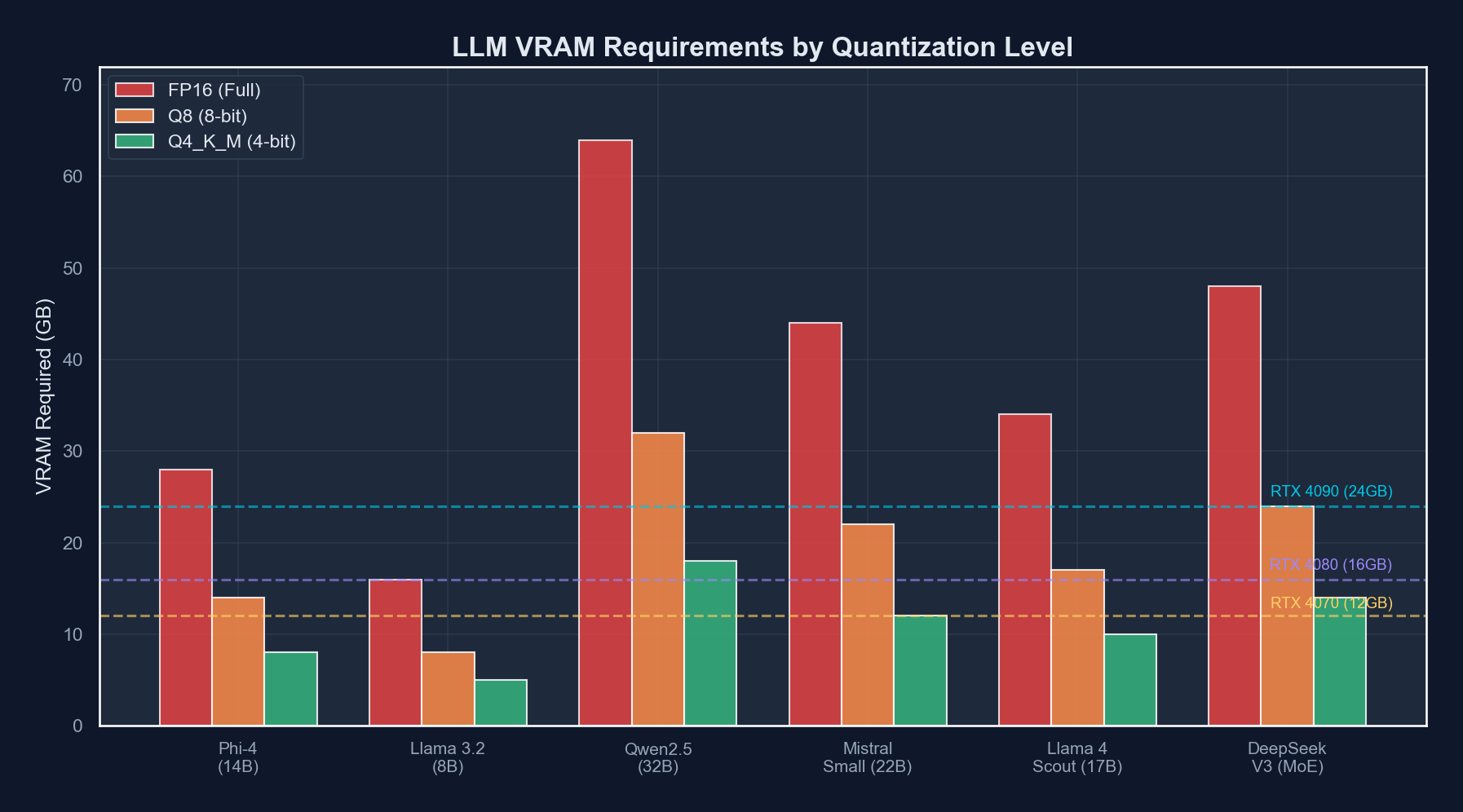
Here is the core problem: a 14B parameter model at FP16 precision needs about 28 GB of VRAM just for the weights. Your RTX 4090 has 24 GB. Your RTX 5090 has 32 GB. Even the smaller model does not fit at full precision on the most popular consumer GPU.
Quantization is the art of reducing the precision of those billions of numbers. Instead of storing each weight as a 16-bit floating-point number, you store it as a 4-bit integer, or an 8-bit integer, or somewhere in between. You lose some precision — the model gets slightly dumber — but you gain the ability to actually run the thing.
Think of it like JPEG compression for neural networks. A high-quality JPEG looks nearly identical to the original photo, but the file is ten times smaller. Similarly, a well-quantized model performs nearly identically to the original, but uses a fraction of the memory.
The Three Formats You Need to Know
GGUF (GPT-Generated Unified Format): The people’s champion. Created by Georgi Gerganov for llama.cpp, GGUF is the most widely supported format for local inference. It supports mixed quantization levels (different layers can have different precision), runs on both CPU and GPU (or a mix of both), and has the largest community and model library. If you are just getting started, GGUF is your format.
GPTQ (GPT Quantization): A GPU-only format that uses a clever calibration process to minimize quality loss during quantization. GPTQ models are slightly higher quality than equivalent GGUF quantizations at the same bit width, but they require the entire model to fit in VRAM — no CPU offloading. Best for users who have enough GPU memory and want maximum quality.
AWQ (Activation-Aware Weight Quantization): The newest of the three, AWQ focuses on preserving the weights that matter most by analyzing which weights are most important based on activation patterns. AWQ models tend to be the highest quality at 4-bit quantization, and they are fast on GPU. The downside is slightly less community support and tooling compared to GGUF.
How Much VRAM Do Quantized Models Actually Need?
This is the table everyone actually wants. Here are real-world VRAM requirements for popular models at common quantization levels:
| Model | Q4_K_M (GGUF) | Q5_K_M (GGUF) | Q8_0 (GGUF) | GPTQ 4-bit | AWQ 4-bit |
|---|---|---|---|---|---|
| Phi-4 (14B) | ~9 GB | ~11 GB | ~15 GB | ~9 GB | ~9 GB |
| Qwen3-14B | ~9 GB | ~11 GB | ~15 GB | ~9 GB | ~9 GB |
| Mistral Medium 3 (24B) | ~15 GB | ~18 GB | ~26 GB | ~15 GB | ~15 GB |
| Llama 4 Scout (17B active) | ~18 GB | ~22 GB | ~32 GB | ~18 GB | ~18 GB |
| Qwen3-72B | ~42 GB | ~50 GB | ~75 GB | ~42 GB | ~42 GB |
| DeepSeek-V4-Lite (30B) | ~18 GB | ~22 GB | ~32 GB | ~18 GB | ~18 GB |
The key takeaway: at Q4_K_M quantization, most 14B models fit comfortably on an RTX 4090 with room to spare for context. The 24-30B class fits tightly. And 70B+ models? Those need either an RTX 5090 with some CPU offloading, or you need to start thinking about multi-GPU setups.
The GPU Showdown: What Can Your Card Actually Handle?
Let us get specific. Here is what you can realistically run on each GPU, and how fast it will go:
| GPU | VRAM | Price (MSRP) | Best Model Tier | Tokens/sec (Q4_K_M) | The Honest Assessment |
|---|---|---|---|---|---|
| RTX 3090 | 24 GB | ~$500 used | 14B models | 35-45 t/s | Old but gold. The budget king. |
| RTX 4070 Ti Super | 16 GB | ~$800 | 7-14B models | 40-50 t/s | Enough for Phi-4, tight for bigger |
| RTX 4090 | 24 GB | ~$1,600 | 14-24B models | 55-75 t/s | The sweet spot. Everyone’s favorite. |
| RTX 5090 | 32 GB | ~$2,000 | 24-30B models | 70-100 t/s | The new champion. 32 GB is a game changer. |
| RTX 5090 x2 | 64 GB | ~$4,000 | 70B+ models | 40-60 t/s | Diminishing returns but 70B is possible |
| Mac M4 Ultra | 192 GB unified | ~$5,000+ | 70B+ easily | 15-25 t/s | Slow but can fit anything in memory |
A few things jump out. The RTX 5090 with 32 GB is the new gold standard for local LLM work — that extra 8 GB over the 4090 opens up the entire 24-30B model class without compromises. The RTX 3090 at used prices is an absolute steal if you do not mind older architecture and higher power consumption. And the Mac M4 Ultra is fascinating — it can fit enormous models in its unified memory, but inference speed is roughly 3-4x slower than equivalent NVIDIA hardware because memory bandwidth, while excellent for a CPU, cannot match dedicated GDDR7.
Inference Engines: Picking Your Weapon
You have a GPU. You have picked a model. Now you need software to actually run it. There are three main options in 2026, and they serve different audiences.
Ollama: The “Just Works” Option
If you want to go from zero to chatting with a local LLM in under five minutes, Ollama is your answer. It is a one-line install, has a dead-simple CLI, and manages model downloads automatically.
# Install ollama
curl -fsSL https://ollama.com/install.sh | sh

# Pull and run a model (yes, it's really this easy)
ollama run llama4-scout

# Or if you want something smaller
ollama run phi4

# List your downloaded models
ollama list

# Run with a specific quantization
ollama run qwen3:14b-q4_K_M
Ollama also exposes an OpenAI-compatible API on localhost:11434, which means you can point any tool that supports OpenAI’s API format at your local model:
from openai import OpenAI

client = OpenAI(
    base_url="http://localhost:11434/v1",
    api_key="ollama"  # Required but not used
)

response = client.chat.completions.create(
    model="llama4-scout",
    messages=[
        {"role": "user", "content": "Explain quantization like I'm five."}
    ]
)

print(response.choices[0].message.content)
Pros: Dead simple, great defaults, automatic GPU detection, built-in model library, active community. Cons: Less control over quantization and inference parameters, slightly slower than raw llama.cpp for power users, limited batching support.
llama.cpp: The Power User’s Playground
llama.cpp is the engine that Ollama is built on top of, but using it directly gives you full control over every parameter. It is a C/C++ inference engine created by Georgi Gerganov, and it is blindingly fast.
# Clone and build
git clone https://github.com/ggerganov/llama.cpp
cd llama.cpp
cmake -B build -DGGML_CUDA=ON
cmake --build build --config Release -j $(nproc)

# Run the server
./build/bin/llama-server \
  -m models/phi-4-q4_k_m.gguf \
  --host 0.0.0.0 \
  --port 8080 \
  -ngl 99 \          # Offload all layers to GPU
  -c 8192 \          # Context length
  -t 8 \             # CPU threads for non-GPU work
  --flash-attn       # Enable flash attention
llama.cpp also supports partial GPU offloading — if your model is too big for VRAM, you can offload some layers to CPU/RAM and keep the rest on GPU. It is slower than full GPU, but it lets you run models that would otherwise not fit:
# Offload only 30 out of 60 layers to GPU (rest on CPU)
./build/bin/llama-server \
  -m models/qwen3-72b-q4_k_m.gguf \
  -ngl 30 \
  -c 4096
Pros: Maximum performance, full parameter control, CPU/GPU hybrid offloading, speculative decoding support, continuous batching. Cons: You need to build from source, manage your own model files, and read some documentation. The horror.
vLLM: The Production Server
If you are building an application that needs to serve multiple users, vLLM is the answer. It implements PagedAttention for efficient memory management and supports continuous batching, meaning it can handle multiple concurrent requests far more efficiently than the other options.
# Install vLLM
pip install vllm

# Start the server
vllm serve "meta-llama/Llama-4-Scout-17B-16E" \
  --quantization awq \
  --max-model-len 8192 \
  --gpu-memory-utilization 0.9 \
  --port 8000
# Or use a config file for more control
# vllm-config.yaml
model: "meta-llama/Llama-4-Scout-17B-16E"
quantization: awq
max_model_len: 8192
gpu_memory_utilization: 0.9
tensor_parallel_size: 1
enable_prefix_caching: true
max_num_seqs: 16Pros: Best throughput for multiple users, efficient memory management, production-ready, supports GPTQ and AWQ natively. Cons: Heavier setup, requires more VRAM overhead, overkill for single-user local inference, Python-based (slower startup than llama.cpp).
So Which One Should You Use?
- “I just want to chat with an AI on my computer” — Ollama
- “I want maximum performance and full control” — llama.cpp
- “I’m building an app that serves multiple users” — vLLM
- “I want to experiment with different models quickly” — Ollama (then graduate to llama.cpp)
 A typical local LLM workstation setup — your GPU doing honest work for once
The Money Question: Local vs. API Calls
Let us do the math that everyone skips. Is running models locally actually cheaper than just paying for API calls?
The Assumptions
- You already own an RTX 4090 (cost: $1,600, but let us amortize it over 3 years)
- Electricity cost: $0.15/kWh (US average)
- RTX 4090 power draw under LLM inference: ~350W
- You use LLMs for about 4 hours per day
- Average generation: 500 tokens per query, 50 queries per day
The Cost Breakdown
Local (RTX 4090):
  GPU amortization: $1,600 / 36 months = ~$44/month
  Electricity: 0.35 kW * 4 hrs * 30 days * $0.15 = ~$6.30/month
  Total: ~$50/month for unlimited tokens

API Calls (GPT-4o equivalent, ~$2.50/1M input, $10/1M output):
  Input: 50 queries * 200 tokens * 30 days = 300K tokens = ~$0.75/month
  Output: 50 queries * 500 tokens * 30 days = 750K tokens = ~$7.50/month
  Total: ~$8.25/month

API Calls (Claude Opus 4, ~$15/1M input, $75/1M output):
  Input: 300K tokens = ~$4.50/month
  Output: 750K tokens = ~$56.25/month
Total: ~$60.75/monthHere is the honest comparison at different usage levels:
| Usage Level | Queries/Day | Local Cost/Month | GPT-4o API/Month | Claude Opus API/Month | Winner |
|---|---|---|---|---|---|
| Light | 20 | ~$50 | ~$3 | ~$24 | API (it is not even close) |
| Moderate | 50 | ~$50 | ~$8 | ~$61 | Depends on model quality needs |
| Heavy | 200 | ~$50 | ~$33 | ~$243 | Local starts looking good |
| Obsessive | 500+ | ~$50 | ~$82 | ~$608 | Local wins decisively |
| Batch processing | 10K+ | ~$50 | ~$1,650+ | ~$12,150+ | Local is a no-brainer |
The crossover point for most people is somewhere around 150-200 queries per day compared to mid-tier API pricing. But remember: the local model is not as capable as GPT-4o or Claude Opus. You are comparing a quantized 14-24B model against a frontier model that likely has hundreds of billions of parameters (or an MoE with trillions). For many tasks — summarization, drafting, code completion, data extraction — the local model is good enough. For tasks requiring deep reasoning, nuanced understanding, or cutting-edge capability, the API models still have a significant edge.
Practical Setup: From Zero to Local LLM in 15 Minutes
Let me walk you through the exact steps I use to get a local LLM running on a fresh machine. We will use Ollama because it is the fastest path.
Step 1: Install Ollama
# Linux/macOS
curl -fsSL https://ollama.com/install.sh | sh

# Verify GPU is detected
ollama --version
nvidia-smi  # Should show your GPU
Step 2: Pull a Model
# Start with Phi-4 -- it is small, fast, and surprisingly capable
ollama pull phi4

# If you have a 4090 or better, grab Llama 4 Scout
ollama pull llama4-scout

# For coding tasks specifically
ollama pull qwen3-coder:14b
Step 3: Test It
# Interactive chat
ollama run phi4

# One-shot query
echo "Write a Python function that finds prime numbers using a sieve" | ollama run phi4

# With system prompt
ollama run phi4 --system "You are a senior Python developer. Be concise."
Step 4: Set Up the API for Your Apps
# app.py - A simple example using the OpenAI-compatible API
from openai import OpenAI

client = OpenAI(
    base_url="http://localhost:11434/v1",
    api_key="ollama"
)

def ask_local_llm(prompt: str, model: str = "phi4") -> str:
    response = client.chat.completions.create(
        model=model,
        messages=[{"role": "user", "content": prompt}],
        temperature=0.7,
        max_tokens=2048
    )
    return response.choices[0].message.content

# Use it like any other API
result = ask_local_llm("Explain the difference between GGUF and GPTQ")
print(result)
Step 5: Create a Modelfile for Custom Configurations
# Create a Modelfile
cat > Modelfile << 'EOF'
FROM llama4-scout

PARAMETER temperature 0.3
PARAMETER top_p 0.9
PARAMETER num_ctx 8192

SYSTEM """You are a senior software engineer at a tech company.
You write clean, well-documented code. You prefer simple solutions
over clever ones. When asked about architecture decisions, you
consider trade-offs explicitly."""
EOF

# Build and run your custom model
ollama create my-coding-assistant -f Modelfile
ollama run my-coding-assistant
Performance Tuning Tips
Once you have things running, here are some tweaks that can squeeze out more performance:
1. Flash Attention. If your inference engine supports it (llama.cpp does, Ollama enables it automatically on supported hardware), flash attention reduces memory usage and speeds up long-context inference by 20-40%.
2. Context length matters. Every token in the context window consumes VRAM for the KV cache. If you only need 4K context, do not set it to 32K. The VRAM savings can be significant — a 14B model at Q4 with 4K context might use 10 GB, but at 32K context it could use 14+ GB.
3. Use the right quantization for your hardware. If your model fits at Q5_K_M, use Q5_K_M instead of Q4_K_M. The quality improvement is noticeable, especially for reasoning and code generation. Only drop to Q4 if you need the VRAM headroom.
4. Pin your model to GPU. If you are using llama.cpp with -ngl 99, it offloads all layers to GPU. If you see layers being offloaded to CPU, you do not have enough VRAM. Either use a smaller model, a more aggressive quantization, or reduce context length.
When to Use Local vs. When to Use the API
After months of running local models alongside API calls, here is my honest framework:
Use local when:
- You are processing sensitive or proprietary data (client code, medical records, financial documents)
- You need to make hundreds or thousands of calls per day (batch processing, CI pipelines, automated testing)
- You want zero-latency responses (local inference starts generating immediately, no network round trip)
- You are offline or in an environment without reliable internet
- You are experimenting and do not want to worry about cost per query
Use the API when:
- You need frontier-level intelligence (complex reasoning, nuanced writing, multi-step planning)
- Your task requires massive context windows (100K+ tokens)
- You are building a production app and need reliability guarantees (SLAs, uptime)
- You do not want to manage hardware, drivers, or model updates
- You need the absolute best quality and cost is secondary
Use both when:
- You route simple tasks to local models and complex tasks to API models
- You use local models for drafting and API models for review
- You use local models for development/testing and API models for production
That last pattern — routing by complexity — is increasingly how sophisticated teams operate. A local Phi-4 handles 80% of your day-to-day queries at zero marginal cost, and you escalate to Claude or GPT-4o for the 20% that actually requires frontier intelligence. Your API bill drops by 80%, and you barely notice the difference.
The Honest Bottom Line
Running LLMs locally in 2026 is no longer a hobby project for tinkerers with too much time and not enough social life. It is a practical, mature option that makes sense for a growing number of use cases. The tooling has gotten dramatically better — Ollama makes it as easy as pulling a Docker image, llama.cpp performance is within spitting distance of data center inference engines, and the quantized model quality at 4-bit is genuinely impressive.
But let us not pretend local models replace frontier APIs. A quantized 14B model is not Claude Opus. It is not GPT-4o. It is a capable, fast, private, cheap workhorse that handles the majority of everyday AI tasks competently. And for many developers, that is exactly what they need.
The best setup in 2026 is not “local OR API.” It is “local AND API,” with smart routing between them. Your GPU runs the everyday stuff. The cloud handles the hard stuff. Your wallet thanks you for both.
Now if you will excuse me, my RTX 4090 has been idle for three minutes and I think it is getting lonely.
Sponsored
More from this category
More from AI Integration
 R.01
R.01 Document AI for Agencies: Extracting Structure from PDFs, Forms, and Contracts
 R.02
R.02 AI Video Generation in 2026: What Agencies Need to Know Before Pitching It to Clients
 R.03
R.03 Browser-Use Agents: Automating the Web When APIs Don't Exist
Sponsored
Discussion
Join the conversation.
Comments are powered by GitHub Discussions. Sign in with your GitHub account to leave a comment.
Sponsored