AI Integration · Developer Tools
84% of Developers Now Use AI Tools, But Trust Is at an All-Time Low: What the Data Really Says
The 2025 Stack Overflow Developer Survey reveals a paradox: AI tool adoption has hit 84%, but developer trust in AI accuracy has plummeted. We analyze the findings, the tools developers actually use, and what the trust gap means.

Anurag Verma
10 min read

Sponsored
The 2025 Stack Overflow Developer Survey, the most comprehensive annual snapshot of the developer community, has landed with a finding that captures the strange moment we are in: 84% of developers now use or plan to use AI tools in their development process, up from 76% the previous year. Yet simultaneously, trust in AI tool accuracy has fallen to an all-time low.
This is not a contradiction. It is a sign of a maturing relationship between developers and AI. The honeymoon is over. Developers have moved past curiosity and novelty into daily, practical use, and they have developed a clear-eyed understanding of both the benefits and the significant limitations of current AI tools. Here is what the data actually tells us.
The Adoption Numbers
The headline figure is striking: 84% of respondents say they use or are planning to use AI tools in their development workflow. Breaking this down further:
- 51% of professional developers use AI tools daily
- 76% used AI tools in the 2024 survey, meaning adoption grew by 8 percentage points in a single year
- AI agent adoption remains early: 52% either do not use agents or stick to simpler AI tools, and 38% have no plans to adopt them
This tells us that while basic AI assistance (code completion, chat-based help, code generation) has become mainstream, the more advanced agentic capabilities, where AI plans and executes multi-step tasks autonomously, have not yet crossed the mainstream adoption threshold.
The Tools Developers Actually Use
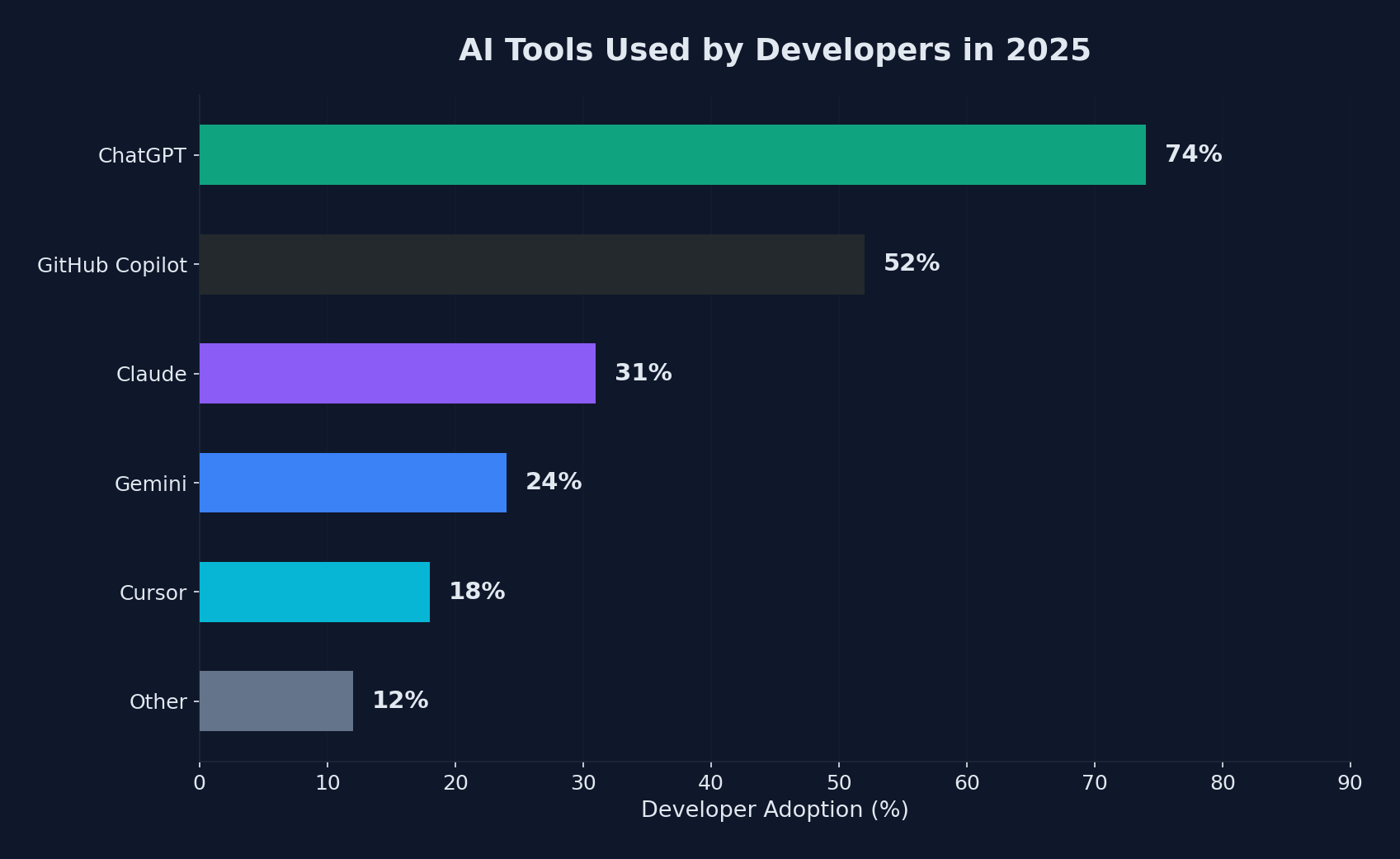 ChatGPT dominates developer tool adoption at 74%, followed by GitHub Copilot and Claude
The survey provides a clear picture of market share among AI tools:
| Tool | Usage Among AI-Using Developers |
|---|---|
| ChatGPT | 82% |
| GitHub Copilot | 68% |
| Claude | ~25% |
| Gemini | ~20% |
| Cursor | ~15% |
| Other | Various |
ChatGPT and GitHub Copilot dominate as the primary entry points for AI-assisted development. ChatGPT’s lead is not surprising given its general-purpose nature: developers use it for everything from debugging to architecture discussions to learning new technologies, not just code generation.
GitHub Copilot’s 68% adoption rate among AI-using developers is remarkable given that it requires a subscription and IDE integration. This represents a significant installed base of developers who have made AI assistance a permanent part of their coding workflow.
The growth of Claude, Gemini, and dedicated AI IDEs like Cursor indicates an increasingly fragmented market where developers use multiple AI tools for different purposes.
The Trust Crisis
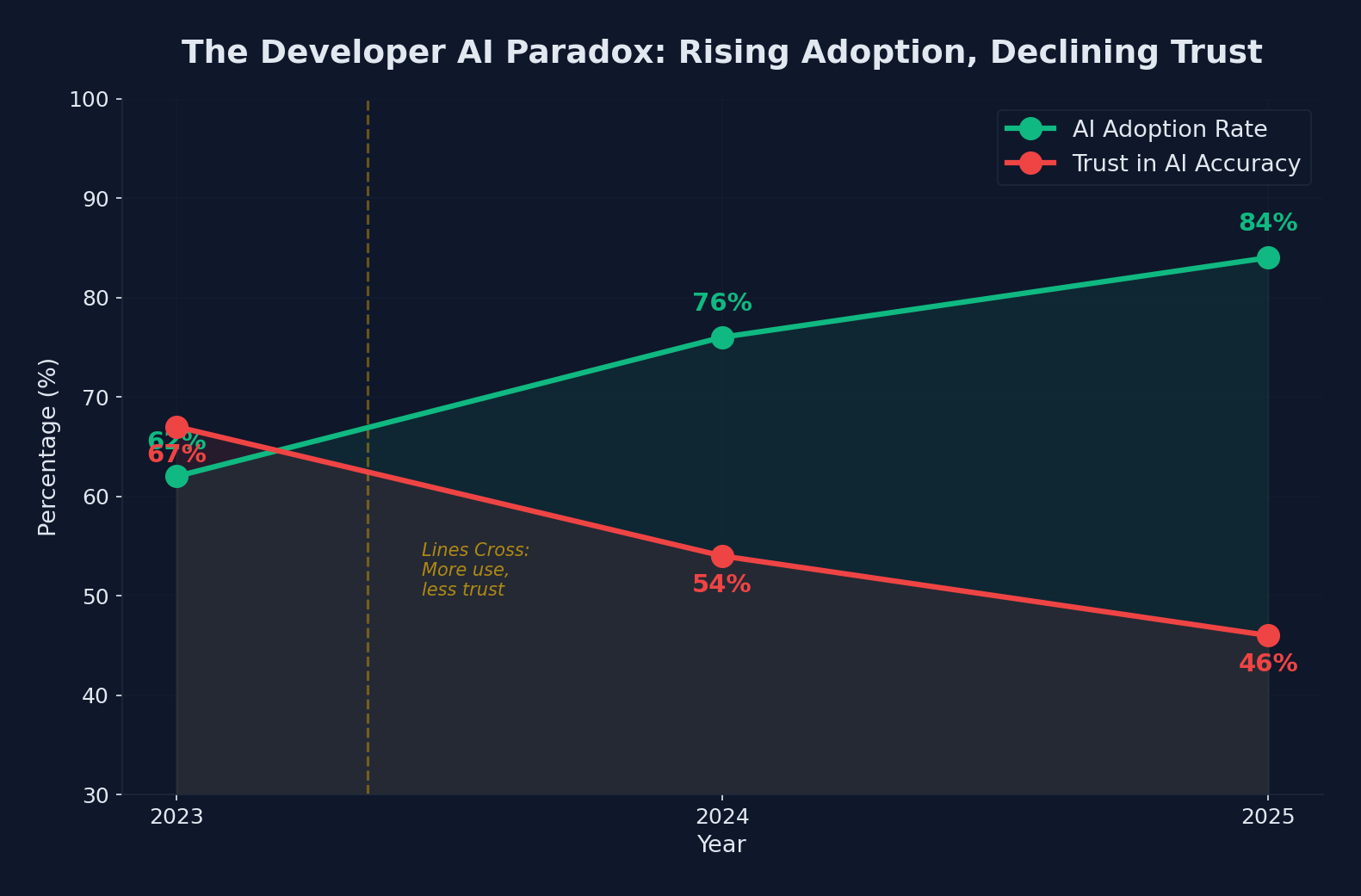 The developer AI paradox: adoption climbs to 84% while trust in accuracy drops to 46%
Here is where the data gets uncomfortable for AI tool vendors. Despite record adoption, trust is declining:
- 46% of developers do not trust the accuracy of AI tool output, up from 31% the previous year
- Only 33% trust AI output, and just 3% report “highly trusting” it
- Experienced developers are the most skeptical: the lowest “highly trust” rate (2.6%) and the highest “highly distrust” rate (20%)
This inverse relationship between experience and trust is telling. Developers who have been writing code the longest, who have the deepest understanding of software correctness and the consequences of bugs, are the least likely to trust AI output uncritically.
Regional Variations in Trust
Trust varies significantly by geography:
| Country | Combined Trust (High + Somewhat) |
|---|---|
| India | 56% |
| Ukraine | 41% |
| Italy | 31% |
| United States | 28% |
| Netherlands | 28% |
| Poland | 26% |
| Canada | 25% |
| France | 25% |
| United Kingdom | 23% |
| Germany | 22% |
The pattern suggests that developers in countries with more established software industries and stronger engineering cultures tend to be more skeptical of AI output. This is not a commentary on developer quality but rather on the expectations and standards these developers apply.
The “Almost Right” Problem
The single biggest frustration cited by developers, at 66%, is dealing with “AI solutions that are almost right, but not quite.” This captures the core challenge of AI-assisted development in its current state.
An AI that produces clearly wrong code is easy to deal with: you reject it and move on. But code that looks correct, passes a cursory review, and even works for most test cases but contains subtle logical errors is far more dangerous. It can slip through code review, reach production, and cause bugs that are difficult to trace back to their AI-generated origin.
The second-biggest frustration, cited by 45% of respondents, is directly related: “Debugging AI-generated code is more time-consuming.” When AI produces almost-right code, the developer must first understand what the AI intended, then identify where it went wrong, then fix it while preserving the parts that are correct. This can be more time-consuming than writing the code from scratch.
# The "almost right" problem in practice:
# AI generates this function to find the longest common subsequence
def lcs(s1, s2):
    m, n = len(s1), len(s2)
    dp = [[0] * (n + 1) for _ in range(m + 1)]

    for i in range(1, m + 1):
        for j in range(1, n + 1):
            if s1[i-1] == s2[j-1]:
                dp[i][j] = dp[i-1][j-1] + 1
            else:
                dp[i][j] = max(dp[i-1][j], dp[i][j-1])

    # BUG: AI reconstructs the subsequence incorrectly
    # This produces wrong results for certain edge cases
    result = []
    i, j = m, n
    while i > 0 and j > 0:
        if s1[i-1] == s2[j-1]:
            result.append(s1[i-1])
            i -= 1
            j -= 1
        elif dp[i-1][j] > dp[i][j-1]:
            i -= 1
        else:
            j -= 1  # Should check >= instead of >

    return ''.join(reversed(result))
This is a typical example: the core algorithm is correct, but a subtle comparison operator issue in the backtracking causes incorrect results for specific inputs. A developer reviewing this quickly might assume it is correct because the overall structure is right.
How Developers Actually Use AI
The survey reveals that developers have developed specific patterns for when and how they use AI:
High-Confidence Use Cases
Developers most commonly and successfully use AI for:
- Boilerplate and scaffolding: Generating configuration files, test structure, API route handlers, and other repetitive code
- Language translation: Converting code between languages or frameworks
- Documentation: Generating docstrings, comments, and README content
- Learning: Understanding unfamiliar codebases, languages, or APIs
- Regex and shell commands: Generating and explaining complex regular expressions and command-line one-liners
Low-Confidence Use Cases
Developers are most cautious when using AI for:
- Security-sensitive code: Authentication, encryption, access control
- Performance-critical code: Algorithms, data structures, optimization
- Business logic: Domain-specific rules that require deep context
- Architecture decisions: System design, technology selection, trade-off analysis
This pattern makes intuitive sense. AI excels at pattern matching and generation for well-established patterns with clear right answers. It struggles with domain-specific nuance and decisions that require understanding the broader context of a system and its users.
The Productivity Impact: It’s Complicated
Despite the trust issues, most developers report net productivity gains from AI tools. The gains, however, are unevenly distributed:
Where AI Saves Time
- Starting new projects: AI dramatically accelerates scaffolding and initial setup
- Writing tests: Generating test cases for existing code is one of AI’s strongest use cases
- Repetitive CRUD operations: Database queries, API endpoints, form handlers
- Documentation: Auto-generating and updating documentation
Where AI Costs Time
- Debugging AI-generated code: The time saved generating code can be lost debugging subtle errors
- Reviewing AI output: Careful review of AI-generated code takes time, especially for complex logic
- Context management: Keeping AI tools correctly informed about your project’s context requires ongoing effort
- Overreliance correction: Teams sometimes need to rework solutions where AI was trusted with too much autonomy
The net impact varies by task, experience level, and how carefully the developer manages the AI’s involvement. Junior developers often see larger raw productivity gains but are also more vulnerable to accepting incorrect AI output. Senior developers tend to use AI more judiciously, with smaller but more reliable productivity improvements.
The AI Dependence Concern
A growing concern in the survey responses is AI dependence. Multiple questions explore whether developers worry about losing skills as they rely more on AI:
- 75% of developers say that even with advanced AI, the number one reason they would still ask a human for help is “when I don’t trust AI’s answers”
- A significant minority report concerns about junior developers not developing fundamental skills because AI handles too much of the learning process
- Some respondents worry about “cargo cult programming”: using AI-generated code without truly understanding how it works
This concern is not unfounded. If a developer always uses AI to generate SQL queries without understanding how query optimizers work, they may write correct queries but will not be able to diagnose performance problems or design efficient schemas. The knowledge gap becomes apparent only when something goes wrong.
Practical Takeaways for Developers
Based on the survey data and the patterns it reveals, here is how to approach AI tools effectively:
1. Use AI as a Starting Point, Not an Endpoint
Generate code with AI, then review and understand every line before committing. If you cannot explain what the code does and why, do not ship it.
2. Build a Verification Habit
For any AI-generated code that handles business logic, security, or data integrity:
# Practical verification workflow
# 1. Generate code with AI
# 2. Write tests BEFORE accepting the generated code
# 3. Run tests to verify correctness
# 4. Review edge cases manually
# 5. Only then commit

# Example: test-first verification for AI-generated code
pytest tests/test_generated_feature.py -v --tb=long
3. Maintain Your Fundamentals
Deliberately practice coding without AI assistance regularly. Use AI for productivity, but make sure you can still write core logic, debug effectively, and design systems without AI support.
4. Be Selective About When to Use AI
The data clearly shows that AI is more reliable for some tasks than others. Use it aggressively for boilerplate, scaffolding, tests, and documentation. Be cautious with security-sensitive code, complex algorithms, and domain-specific business logic.
5. Track Your Own Trust Calibration
Pay attention to when AI-generated code is wrong and what types of errors occur. Over time, build your own mental model of when to trust AI suggestions and when to be skeptical. Your personal experience is more valuable than any general guideline.
What This Means for the Industry
The 84% adoption figure suggests AI-assisted development is no longer a trend to watch. It is the new normal. But the declining trust figures indicate the industry still has significant work to do on reliability, explainability, and developer experience.
For AI tool vendors, the message is clear: adoption is not the problem. Trust is. The next wave of competitive advantage will go to tools that are reliably correct, that clearly communicate their confidence levels, and that make it easy for developers to verify output. The “generate lots of code fast” era is giving way to the “generate correct code I can trust” era.
For development teams, the implication is that AI tool adoption needs to be managed, not just allowed. Teams should establish guidelines for when AI is appropriate, require human review for critical code paths, and invest in testing infrastructure that catches AI-generated errors before they reach production.
The 84% figure is a milestone. But the trust gap is the real story, and closing it is the defining challenge for AI-assisted development in the years ahead.
Sponsored
More from this category
More from AI Integration
 R.01
R.01 Document AI for Agencies: Extracting Structure from PDFs, Forms, and Contracts
 R.02
R.02 AI Video Generation in 2026: What Agencies Need to Know Before Pitching It to Clients
 R.03
R.03 Browser-Use Agents: Automating the Web When APIs Don't Exist
Sponsored
Discussion
Join the conversation.
Comments are powered by GitHub Discussions. Sign in with your GitHub account to leave a comment.
Sponsored