AI Integration · Developer Tools
Cursor vs Windsurf vs GitHub Copilot: The Definitive AI IDE Comparison for 2026
A comprehensive head-to-head comparison of Cursor, Windsurf (Codeium), and GitHub Copilot Workspace in 2026. We compare agentic capabilities, pricing, codebase understanding, and real-world performance.

Anurag Verma
10 min read

Sponsored
The AI-powered IDE landscape has matured dramatically since the early days of basic autocomplete suggestions. In 2026, developers face a genuine choice between three serious contenders: Cursor, Windsurf (formerly Codeium), and GitHub Copilot. Each has evolved from simple code completion into full agentic development environments capable of planning, executing, and iterating on multi-file changes autonomously.
This is not a surface-level overview. We have tested all three extensively across real-world projects to help you decide which one deserves your subscription dollars and, more importantly, your trust.
Architecture and Philosophy
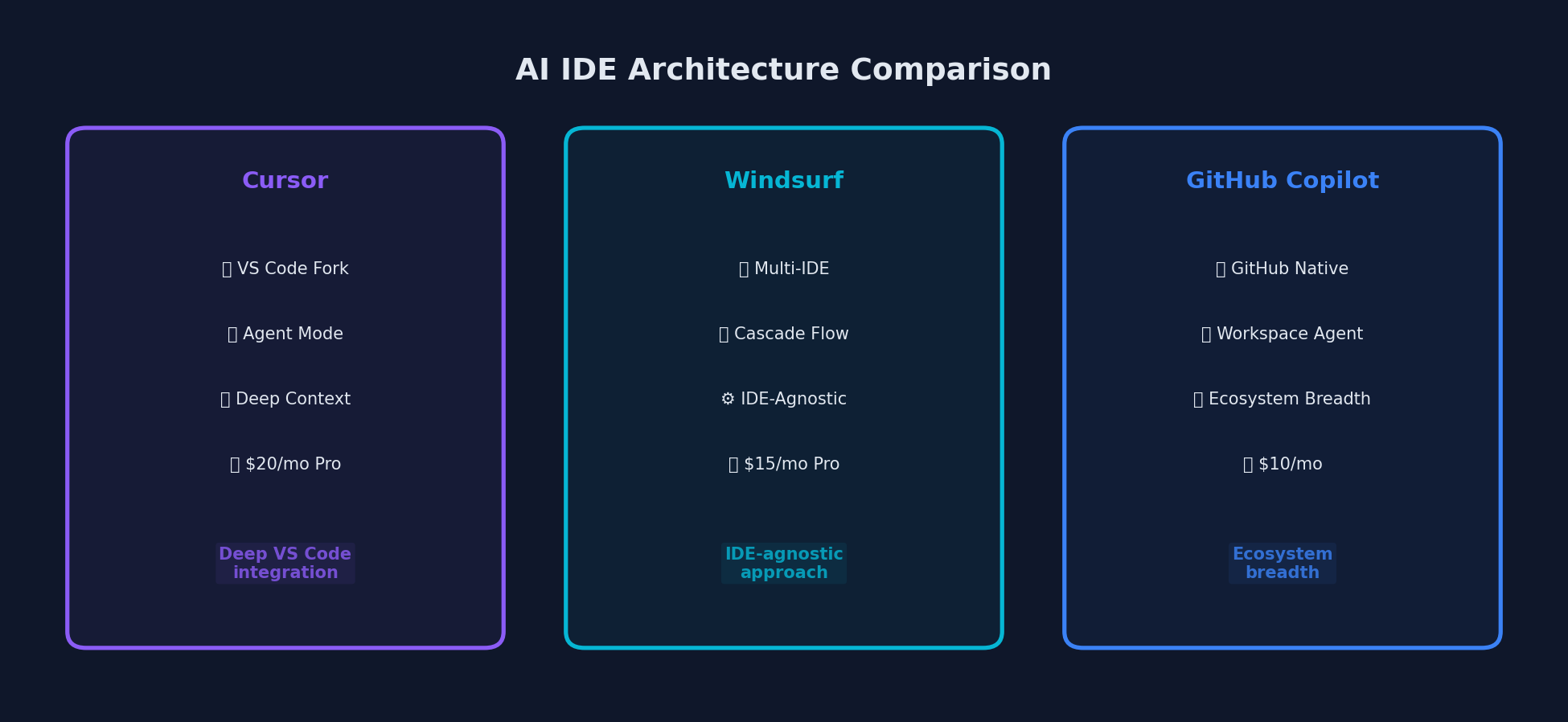 Three distinct approaches to AI-powered development: deep integration, IDE-agnostic, and ecosystem breadth
Before comparing features, it is worth understanding the fundamentally different approaches these tools take.
Cursor is a fork of Visual Studio Code that rebuilds the IDE experience around AI from the ground up. Everything, from the sidebar to the terminal to the file explorer, is designed with AI-assisted workflows in mind. The trade-off is that you must use the Cursor editor exclusively.
Windsurf (formerly Codeium) takes a hybrid approach. It offers both a dedicated Windsurf Editor (also VS Code-based) and plugins that integrate into over 40 existing IDEs, including JetBrains products. This gives developers flexibility without forcing an editor switch.
GitHub Copilot prioritizes integration breadth. It works inside VS Code, JetBrains IDEs, Neovim, and even the terminal via Copilot CLI. GitHub Copilot Workspace, the agentic component, operates as a cloud-based environment tied to your GitHub repositories.
Agentic Capabilities: The Core Battleground
The most significant evolution in 2026 is the shift from code completion to agentic coding, where the AI plans multi-step changes, executes them across files, runs tests, and iterates until the task is complete.
Cursor: Agent Mode and Composer
Cursor 2.0 introduced a paradigm shift with its agent-centric interface. Agents, plans, and runs are first-class objects in the sidebar. You can have multiple agents working in parallel on the same project, each handling a different task like refactoring, fixing tests, or polishing UI.
Example Cursor Agent workflow:
1. Open Agent sidebar
2. Describe task: "Refactor the authentication module to use JWT
   tokens instead of session cookies. Update all route handlers
   and add proper token refresh logic."
3. Agent creates a plan with file-by-file changes
4. Review and approve the plan
5. Agent executes changes across 12 files
6. Agent runs test suite and fixes 2 failing tests
7. Review final diff
Cursor’s Composer mode allows for multi-file editing with full project context. It indexes your entire repository, builds embeddings, and uses this understanding to generate contextually accurate code. The quality of its codebase understanding is arguably the best in the field.
Windsurf: Cascade and Plan Mode
Windsurf’s agentic assistant, Cascade, operates in three modes: Code, Chat, and the newer Plan mode. Cascade tracks all your actions, including edits, terminal commands, clipboard content, and conversation history, to infer intent and adapt in real time.
Example Windsurf Cascade workflow:
1. Open Cascade in Plan mode
2. Describe goal: "Add a caching layer to our API endpoints
   using Redis, with configurable TTL per route"
3. Cascade creates a detailed implementation plan
4. Review and refine the plan before any code is written
5. Switch to Code mode to execute
6. Cascade implements changes with full awareness of your
   existing middleware stack
Windsurf’s Arena Mode is a unique feature: it runs two Cascade agents side-by-side with hidden model identities and lets you vote on which performs better. This helps you discover which models actually work best for your specific workflow.
GitHub Copilot: Workspace and Coding Agent
GitHub Copilot Workspace takes the most ambitious approach. When you assign a bug or feature via a GitHub Issue, the agent analyzes your entire repository, creates a technical specification, generates a plan, writes code across multiple files, and runs tests until they pass. It then opens a Pull Request for your review.
Example Copilot Workspace workflow:
1. Create GitHub Issue: "Add dark mode support to the dashboard"
2. Copilot Workspace generates a Specification document
3. Review and edit the specification
4. Workspace generates a Plan with file-by-file changes
5. Approve the plan
6. Workspace executes in a Codespace environment
7. Self-healing: if build fails, reads logs and self-corrects
8. Opens PR with all changes when complete
The self-healing build capability is particularly impressive. Workspace runs your build command in a GitHub Codespace, and if it fails, it reads the error logs and iterates on the code until the build passes.
Feature Comparison Table
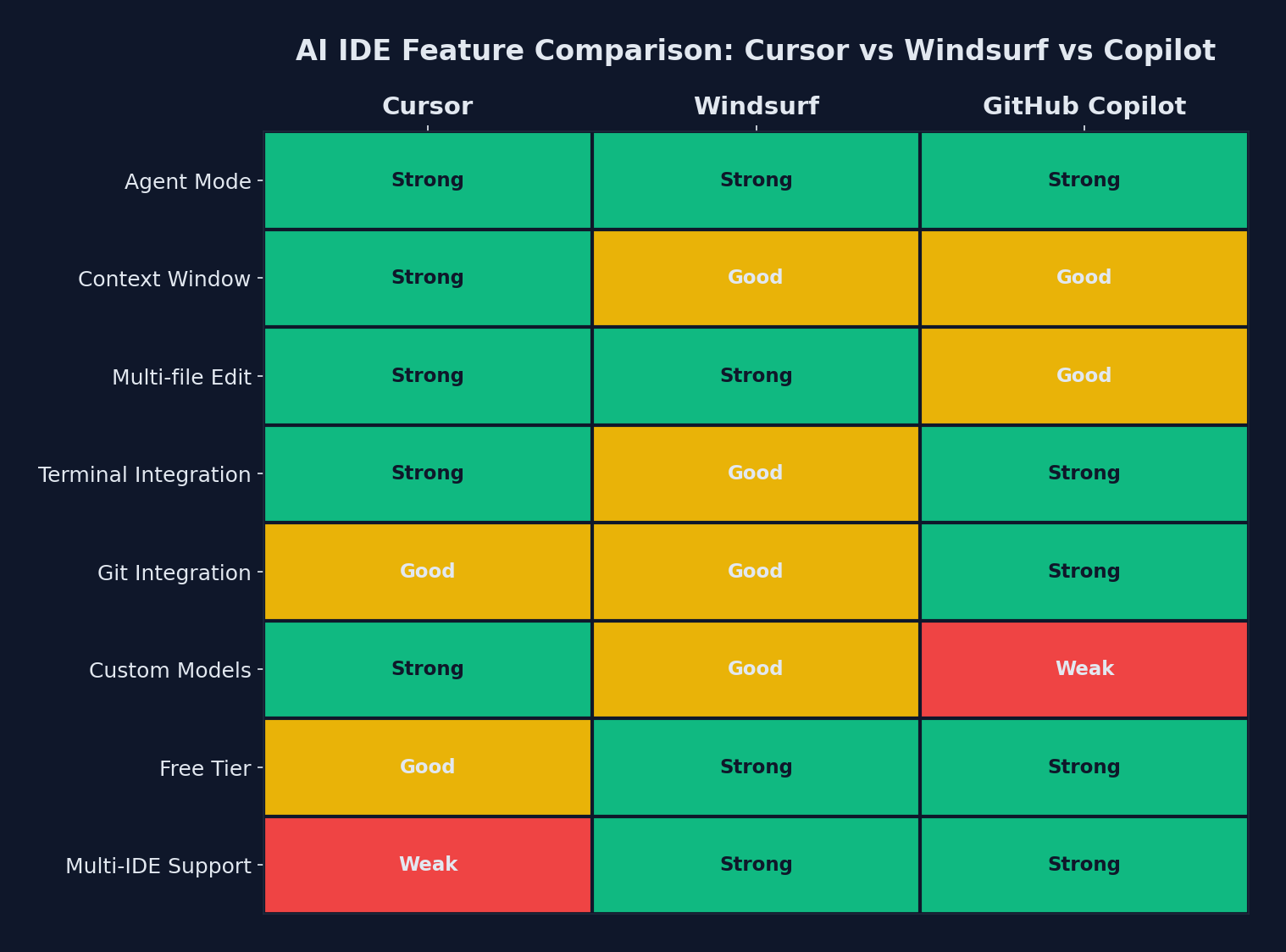 Feature comparison heatmap: green indicates strong capability, red indicates weakness
| Feature | Cursor | Windsurf | GitHub Copilot |
|---|---|---|---|
| Editor Base | VS Code fork (exclusive) | VS Code fork + 40+ IDE plugins | VS Code, JetBrains, Neovim, CLI |
| Agent Mode | Multi-agent parallel | Cascade (Code/Chat/Plan) | Workspace (Issue-to-PR) |
| Codebase Indexing | Full repo embeddings | Deep context awareness | Repository-wide analysis |
| Multi-file Editing | Composer | Cascade Code mode | Workspace |
| Terminal Integration | Built-in AI terminal | Terminal context awareness | Copilot CLI |
| Self-Healing Builds | No | No | Yes (via Codespaces) |
| Model Selection | Multiple (Claude, GPT, Gemini) | Multiple + Arena Mode | GPT-5.2, Claude 4.5, Gemini 3 |
| Background Agents | Yes (parallel agents) | Yes (side-by-side) | Yes (async PR creation) |
| MCP Support | Yes | Yes (curated servers) | Limited |
| Git Integration | Standard | Standard | Deep (native GitHub) |
| Code Review | Basic | Basic | Built-in PR review |
Codebase Understanding
This is where the tools diverge most significantly in practice.
Cursor excels at understanding large, complex codebases. Its indexing system builds a semantic map of your repository that enables remarkably accurate multi-file suggestions. When you ask Cursor to refactor a function, it understands the downstream implications across your project. For monorepos and large enterprise codebases, Cursor’s understanding is noticeably superior.
Windsurf approaches context differently. Cascade maintains a persistent memory of your workflow, including your edits, terminal commands, and conversations. This means it gets better over time as it learns your patterns. For long coding sessions where context accumulates, Windsurf can feel more intuitive than competitors.
GitHub Copilot has the advantage of deep integration with your Git history. Workspace can analyze commit patterns, PR discussions, and issue threads to understand not just what your code does, but why it was written that way. This is uniquely powerful for teams that maintain thorough Git workflows.
Pricing Breakdown
Pricing has become increasingly complex as these tools have moved to credit-based and tiered models.
Cursor Pricing (2026)
| Plan | Price | Key Inclusions |
|---|---|---|
| Hobby | Free | 50 premium requests, 500 free model requests/month |
| Pro | $20/month | Extended agent requests, unlimited tab completions, background agents |
| Pro+ | $60/month | 3x usage of premium models |
| Ultra | $200/month | 20x usage, priority feature access |
| Teams | $40/user/month | Centralized billing, admin controls |
| Enterprise | Custom | SSO, audit logs, dedicated support |
Cursor transitioned from request-based to credit-based billing in mid-2025. Agent Mode consumes credits faster because each multi-step task involves several model calls behind the scenes. All paid tiers include a 20% discount for annual commitments.
Windsurf Pricing (2026)
| Plan | Price | Key Inclusions |
|---|---|---|
| Free | $0 | Basic completions, limited Cascade |
| Pro | $15/month | Full Cascade access, Plan mode, Arena mode |
| Teams | $25/user/month | Shared context, admin dashboard |
| Enterprise | Custom | On-premises option, SSO, compliance |
Windsurf offers the most generous free tier, making it the best entry point for developers exploring AI-assisted coding for the first time.
GitHub Copilot Pricing (2026)
| Plan | Price | Key Inclusions |
|---|---|---|
| Free | $0 | Limited completions, limited chat |
| Pro | $10/month | Full completions, chat, agent mode |
| Pro+ | $39/month | Premium model access, unlimited usage |
| Business | $19/user/month | Organization management, policy controls |
| Enterprise | $39/user/month | Fine-tuned models, IP indemnity, SAML SSO |
GitHub Copilot remains the most affordable option for individual developers at $10/month for the Pro tier. The free tier, while limited, gives every developer access to basic AI assistance.
Real-World Performance
Code Completion Speed
For inline completions (the “ghost text” that appears as you type), all three tools are fast enough that latency is not a practical concern. GitHub Copilot has a slight edge in raw speed for simple completions. Cursor and Windsurf produce longer, more contextual suggestions that sometimes take an extra beat to generate but are more often correct.
Agent Task Completion
For complex, multi-file tasks, our testing found:
- Cursor completed the most tasks correctly on the first attempt, particularly for refactoring and architectural changes. Its codebase understanding translates directly into fewer errors.
- Windsurf performed best on iterative tasks where the context built up over multiple interactions. Its persistent memory meant fewer repeated explanations.
- GitHub Copilot Workspace was the most reliable for issue-to-PR workflows and excelled when tasks were well-defined in GitHub Issues. The self-healing build feature saved significant time when changes broke the build.
Context Window and Memory
Cursor and Windsurf both support large context windows with the latest models. Cursor’s codebase indexing effectively extends its context beyond the model’s raw token limit. Windsurf’s persistent session memory serves a similar purpose. GitHub Copilot Workspace, by operating in a cloud environment, can analyze entire repositories without the local memory constraints of a desktop application.
Who Should Choose What
Choose Cursor If:
- You work on large, complex codebases or monorepos
- Multi-file refactoring is a frequent part of your workflow
- You want the most powerful agent capabilities available today
- You do not mind using a dedicated editor
- You are a power user willing to pay $20-60/month for the best tools
Choose Windsurf If:
- You want AI assistance across multiple IDEs, especially JetBrains
- You prefer a tool that learns your patterns over time
- You are budget-conscious but want strong agentic features
- You work in long coding sessions where accumulated context matters
- You are new to AI-assisted development and want a generous free tier
Choose GitHub Copilot If:
- Your team is deeply invested in the GitHub ecosystem
- You want the broadest editor support without switching tools
- Issue-to-PR automation would significantly improve your workflow
- You need enterprise features like IP indemnity and fine-tuned models
- You want the most affordable paid option at $10/month
The Bigger Picture
The AI IDE market in 2026 is not a zero-sum game. Many professional developers use more than one tool. A common pattern is GitHub Copilot for everyday completions inside your preferred IDE, combined with Cursor or Windsurf for complex agentic tasks that require deeper project understanding.
What is clear is that AI-assisted development is no longer optional for competitive teams. The productivity gains from these tools, when used effectively, range from 20% to 50% depending on the task. The question is no longer whether to adopt an AI IDE, but which combination best fits your workflow.
The best tool is the one that integrates most naturally into how you already work. Try the free tiers of all three, use them on real projects for at least a week each, and let your own experience guide the decision.
Sponsored
More from this category
More from AI Integration
 R.01
R.01 Document AI for Agencies: Extracting Structure from PDFs, Forms, and Contracts
 R.02
R.02 AI Video Generation in 2026: What Agencies Need to Know Before Pitching It to Clients
 R.03
R.03 Browser-Use Agents: Automating the Web When APIs Don't Exist
Sponsored
Discussion
Join the conversation.
Comments are powered by GitHub Discussions. Sign in with your GitHub account to leave a comment.
Sponsored