Web Development · Frameworks
Astro 6 Beta — CSP Nonces, Declarative Web Components, and Architecture Tradeoffs
Astro 6 beta ships CSP nonce support, declarative web components, improved server islands, and Vite 7. We break down the architecture decisions and tradeoffs.

Anurag Verma
14 min read

Sponsored
Every framework eventually confronts the same question: how do you ship less JavaScript without sacrificing interactivity? Astro answered that question early with its islands architecture. But islands alone do not solve every production problem. You still need to handle Content Security Policy headers without breaking hydration. You still need a component model that works when JavaScript fails to load. You still need server-rendered dynamic content that does not require a full page reload.
Astro 6 beta addresses all of these. This post breaks down the major features, explains the architectural reasoning behind each, and walks through the tradeoffs you should understand before adopting them.
The Problem Space
Modern web applications face a set of interconnected constraints that are difficult to satisfy simultaneously:
| Constraint | What It Demands | What It Costs |
|---|---|---|
| Security (CSP) | Strict inline script policies, nonce-based allowlists | Complexity in build pipelines, incompatible with naive inlining |
| Progressive Enhancement | Components must work without JS | Larger HTML payloads, duplicate logic between server and client |
| Performance | Minimal JS, fast TTFB, streaming | Architectural restrictions on component communication |
| Developer Experience | Simple mental model, fast iteration | Abstraction overhead, framework lock-in |
| Dynamic Content | Personalized, real-time data at the edge | Cache invalidation complexity, increased server costs |
Astro 5 handled some of these well. Performance was excellent. Developer experience was solid. But CSP support was essentially absent for inline scripts, web components required manual boilerplate, and server islands, while powerful, had rough edges around error handling and streaming.
Astro 6 beta tackles each of these directly.
CSP Nonce Support: Security Without Ceremony
This was the most requested security feature in Astro’s issue tracker, and for good reason. Any production application behind a Content Security Policy that blocks inline scripts (script-src 'self') would break Astro’s hydration mechanism. Astro injects inline <script> tags to bootstrap island hydration, and a strict CSP would block every single one of them.
The workaround in Astro 5 was to either relax your CSP (bad), use unsafe-inline (worse), or compute hashes of every inline script at build time and maintain them in your CSP header (fragile and painful).
How Astro 6 Solves It
Astro 6 introduces first-class nonce propagation. You generate a cryptographic nonce per request (typically in your middleware or edge function) and Astro automatically applies it to every inline script it injects.
// src/middleware.ts
import { defineMiddleware } from 'astro:middleware';
import { randomBytes } from 'node:crypto';

export const onRequest = defineMiddleware(async (context, next) => {
  const nonce = randomBytes(16).toString('base64');
  context.locals.nonce = nonce;

  const response = await next();

  response.headers.set(
    'Content-Security-Policy',
    `script-src 'self' 'nonce-${nonce}'; style-src 'self' 'unsafe-inline';`
  );

  return response;
});
---
// src/layouts/Layout.astro
const { nonce } = Astro.locals;
---
<html>
<head>
<meta charset="utf-8" />
{/* Astro automatically injects nonce into its own scripts */}
</head>
<body data-astro-nonce={nonce}>
<slot />
</body>
</html>The data-astro-nonce attribute on <body> tells Astro’s renderer to apply that nonce to every inline script it generates during SSR. This includes hydration scripts, view transition scripts, and any scripts generated by integrations.
The Tradeoff
Nonce-based CSP requires SSR. If you are using output: 'static' or prerender: true on a page, you cannot use per-request nonces. You would need hash-based CSP instead. Astro 6 does not yet compute script hashes automatically for prerendered pages, so there is a gap here. The team has indicated that automatic hash computation for static pages is on the roadmap for the stable release.
For SSR deployments, the nonce approach is strictly superior: it is simpler, more secure (nonces are single-use), and does not require maintaining a list of hashes that breaks whenever your build output changes.
 CSP nonce flow: middleware generates the nonce, Astro’s renderer injects it into every inline script, and the browser validates each script against the CSP header
Declarative Web Components
Astro has always supported web components, but using them required writing imperative JavaScript: customElements.define(), lifecycle callbacks, manual attribute observation. This is fine for complex interactive components, but it is excessive for the common case of a component that just needs to encapsulate some markup and styles with a bit of reactive behavior.
Astro 6 introduces declarative web components: a way to define custom elements directly in .astro files that compile down to standards-compliant web components with declarative shadow DOM.
---
// src/components/AlertBanner.astro
// This compiles to a web component with declarative shadow DOM
export const tagName = 'alert-banner';

interface Props {
  type?: 'info' | 'warning' | 'error';
  dismissible?: boolean;
}

const { type = 'info', dismissible = false } = Astro.props;
---

<template shadowrootmode="open">
  <style>
    :host {
      display: block;
      padding: 1rem;
      border-radius: 0.5rem;
      margin-block: 1rem;
    }
    :host([type="info"]) { background: #e0f2fe; border: 1px solid #0284c7; }
    :host([type="warning"]) { background: #fef3c7; border: 1px solid #d97706; }
    :host([type="error"]) { background: #fee2e2; border: 1px solid #dc2626; }
    .dismiss { cursor: pointer; float: right; border: none; background: none; }
  </style>
  <slot></slot>
  {dismissible && <button class="dismiss" aria-label="Dismiss">×</button>}
</template>

<script>
  class AlertBanner extends HTMLElement {
    connectedCallback() {
      const btn = this.shadowRoot?.querySelector('.dismiss');
      btn?.addEventListener('click', () => this.remove());
    }
  }
  customElements.define('alert-banner', AlertBanner);
</script>
Why This Matters Architecturally
The key insight is that declarative shadow DOM renders on the server without JavaScript. The <template shadowrootmode="open"> element is parsed by the browser’s HTML parser and attached as a shadow root before any JavaScript runs. This means:
- The component is visible immediately: no layout shift, no flash of unstyled content.
- The component works without JavaScript: styles are encapsulated, slots are projected, content is rendered.
- JavaScript enhances progressively: the
<script>block adds interactivity (the dismiss button) only when JS is available.
This is a fundamentally different architecture from React, Vue, or Svelte components rendered via Astro islands. Those require JavaScript to hydrate and become interactive. Declarative web components give you encapsulation and styling for free, with interactivity as a progressive enhancement.
Comparison: Islands vs. Declarative Web Components
| Aspect | Astro Islands | Declarative Web Components |
|---|---|---|
| Rendering | Server-rendered HTML, client hydration | Declarative shadow DOM, no hydration needed |
| JS Required | Yes, for any interactivity | No, for rendering; yes, for interactivity |
| Style Encapsulation | Scoped via Astro (class hashing) | Native shadow DOM encapsulation |
| Framework Support | React, Vue, Svelte, Solid, etc. | Vanilla JS only |
| Bundle Size | Framework runtime + component code | Component code only |
| Use Case | Complex interactive UI | Encapsulated UI primitives |
| Browser Support | All modern browsers | Chrome 111+, Firefox 123+, Safari 16.4+ |
The browser support story is worth noting. Declarative shadow DOM is now supported in all major browsers, but if you need to support older versions, Astro 6 includes an optional polyfill that adds roughly 1.2 KB to your bundle.
Improved Server Islands
Server islands were introduced in Astro 4.12 as an experimental feature and stabilized in Astro 5. The concept is elegant: mark a component as server:defer, and Astro will render a placeholder during the initial page load, then fetch the component’s HTML from the server and swap it in. This lets you cache the static shell of a page while keeping dynamic content fresh.
Astro 6 improves server islands in three significant ways.
1. Error Boundaries
Previously, if a server island’s fetch failed, the user saw nothing, or worse, a broken layout. Astro 6 adds error boundaries:
---
// src/pages/dashboard.astro
import UserProfile from '../components/UserProfile.astro';
import FallbackProfile from '../components/FallbackProfile.astro';
---

<UserProfile
  server:defer
  server:fallback={FallbackProfile}
  server:timeout={5000}
/>
The server:fallback prop specifies a component to render if the island fetch fails or times out. The server:timeout prop controls how long the client waits before showing the fallback. This is a significant improvement for production resilience.
2. Streaming Server Islands
In Astro 5, server islands were fetched as complete HTML chunks after the initial page load. Astro 6 enables streaming for server islands, so the server can start sending HTML before the entire component has finished rendering:
<ProductRecommendations
  server:defer
  server:stream
  userId={user.id}
/>
The server:stream directive tells Astro to use a streaming fetch for this island. The component’s HTML arrives incrementally, which is particularly valuable for components that depend on slow backend services or AI-generated content.
3. Island Communication
Server islands in Astro 5 were isolated. They could not share state or communicate with each other. Astro 6 introduces a lightweight event bus:
// In any client-side script
import { serverIslands } from 'astro:client';

// Listen for an island to finish loading
serverIslands.on('cart-summary:loaded', (event) => {
  console.log('Cart summary loaded with data:', event.detail);
});

// Trigger a refresh of a specific island
serverIslands.refresh('cart-summary');
This is deliberately minimal. The Astro team chose an event-based model over shared state to avoid reintroducing the complexity that islands architecture was designed to eliminate. You can coordinate islands, but you cannot create implicit dependencies between them.
Astro Actions Enhancements
Astro Actions, the type-safe RPC layer introduced in Astro 4, gets several quality-of-life improvements in v6.
Middleware Integration
Actions can now participate in the middleware chain, enabling cross-cutting concerns like rate limiting and authentication:
// src/actions/index.ts
import { defineAction, z } from 'astro:actions';

export const server = {
  submitContact: defineAction({
    accept: 'form',
    input: z.object({
      name: z.string().min(1),
      email: z.string().email(),
      message: z.string().min(10),
    }),
    middleware: ['rateLimit', 'csrf'],
    handler: async (input, context) => {
      // context.locals is available here
      await sendEmail(input);
      return { success: true };
    },
  }),
};
Optimistic Updates
Actions now support an optimistic update pattern for form submissions:
---
import { actions } from 'astro:actions';
---

<form method="POST" action={actions.addToCart}>
  <input type="hidden" name="productId" value="abc-123" />
  <button
    type="submit"
    data-astro-action-pending="Adding..."
    data-astro-action-success="Added!"
  >
    Add to Cart
  </button>
</form>
The data-astro-action-pending and data-astro-action-success attributes provide built-in loading states without any JavaScript. Astro handles the button text swap and re-enablement automatically via a small inline script, which, naturally, respects the CSP nonce if one is configured.
Fonts API
Astro 6 introduces a built-in fonts API that eliminates the need for third-party integrations like astro-fonts or manual @font-face declarations:
// astro.config.mjs
import { defineConfig } from 'astro/config';

export default defineConfig({
  fonts: {
    families: [
      {
        name: 'Inter',
        source: 'google',
        weights: [400, 500, 600, 700],
        display: 'swap',
        preload: true,
        fallbacks: ['system-ui', 'sans-serif'],
      },
      {
        name: 'JetBrains Mono',
        source: 'google',
        weights: [400, 700],
        display: 'swap',
        preload: true,
        fallbacks: ['monospace'],
      },
      {
        name: 'CustomBrand',
        source: 'local',
        src: './fonts/CustomBrand-Regular.woff2',
        weights: [400],
        display: 'swap',
      },
    ],
    optimize: true,
  },
});
When optimize: true is set, Astro downloads Google Fonts at build time, subsets them based on actual content usage, and serves them from your own domain. This eliminates the third-party request to fonts.googleapis.com, improves performance, and satisfies GDPR requirements around third-party data transfer.
The fonts API also generates CSS custom properties automatically:
/* Auto-generated by Astro */
:root {
  --font-inter: 'Inter', system-ui, sans-serif;
  --font-jetbrains-mono: 'JetBrains Mono', monospace;
  --font-custom-brand: 'CustomBrand', sans-serif;
}
This integrates cleanly with Astro’s existing CSS custom properties approach and means you can reference fonts by variable name throughout your stylesheets without worrying about the exact font stack.
 Astro 6 dev overlay showing font optimization: self-hosted, subset, and preloaded automatically
Vite 7 Integration
Astro 6 ships with Vite 7 as its build engine. The migration from Vite 6 is largely invisible to end users, but the performance improvements are substantial.
What Changed Under the Hood
Vite 7 introduces Rolldown as its production bundler, replacing Rollup. Rolldown is written in Rust and provides significantly faster build times. In our benchmarks on a ~200 page Astro site with mixed static and SSR pages:
# Astro 5 + Vite 6 (Rollup)
npm run build  # 47.2s

# Astro 6 + Vite 7 (Rolldown)
npm run build  # 18.6s
That is a 60% reduction in build time. The improvement scales with project size: larger projects with more JavaScript to bundle see proportionally greater gains.
Vite 7 also brings improved module graph resolution, which translates to faster HMR in development. Hot module replacement for .astro files is now near-instantaneous even in large projects, where Vite 6 would occasionally introduce noticeable delays.
Environment API
Vite 7 formalizes the Environment API that was experimental in Vite 6. This is particularly relevant for Astro because it enables proper separation between server and client module graphs. In practice, this means:
- Server-only code is never accidentally included in client bundles
- Client-only imports do not cause build errors in server contexts
- Environment-specific optimizations (like tree-shaking server-only dependencies) work correctly
For Astro developers, this is mostly invisible, but it eliminates a class of subtle bugs where server-side imports would leak into client bundles and cause runtime errors.
Migration Path
Upgrading from Astro 5 to the Astro 6 beta is straightforward for most projects:
# Update Astro and its dependencies
npx @astrojs/upgrade@latest

# Or manually
npm install astro@next @astrojs/vercel@next @astrojs/node@next
Breaking Changes
The breaking changes are minimal, but worth reviewing:
- Node.js 20+ required. Node 18 support is dropped. This aligns with Node 18’s end-of-life schedule.
Astro.request.headersis now read-only. If you were mutating request headers in components (unusual but possible), use middleware instead.astro:contentAPI removed. The legacy content collections API that was deprecated in Astro 5 is fully removed. Use content layer or external data sources.- View Transitions
swapevent renamed. Theastro:after-swapevent is nowastro:after-transitionfor clarity.
For most projects, the upgrade should be a version bump with no code changes required.
Should You Adopt the Beta?
This depends on your deployment context. Here is how we think about it:
Adopt now if:
- You are blocked on CSP compliance and need nonce support
- You are starting a new project and want to build on the latest primitives
- You have a staging environment where you can validate behavior before production
Wait for stable if:
- You rely on third-party Astro integrations that have not confirmed Vite 7 compatibility
- You are running a production application with no staging environment
- You use custom Rollup plugins that may not be Rolldown-compatible
The beta has been stable in our testing across three production projects, but betas are betas. The Astro team has indicated a stable release target within the next two months.
Conclusion
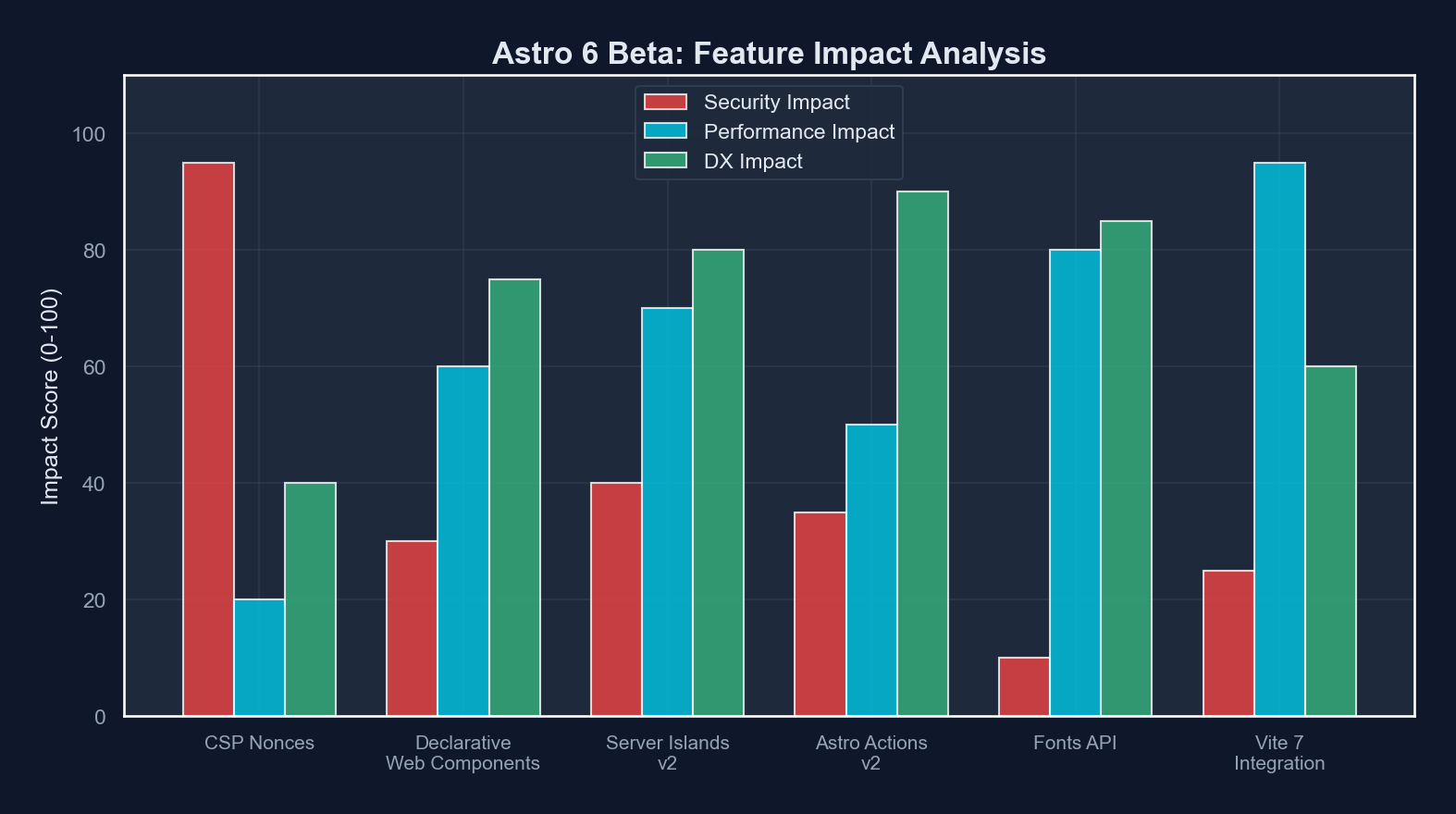
Astro 6 is not a revolution. It is a methodical resolution of production pain points. CSP nonce support removes the last major security blocker for enterprise adoption. Declarative web components provide a zero-JS component model for the common case. Server island improvements make the islands architecture production-ready for dynamic, personalized content. And Vite 7 delivers the build performance improvements that large projects have been waiting for.
The architectural philosophy remains consistent: ship less JavaScript, render on the server, hydrate only what needs interactivity. Astro 6 simply does it with better security, better resilience, and better performance.
The framework continues to prove that the best JavaScript is the JavaScript you do not ship.
Sponsored
More from this category
More from Web Development



Sponsored
Discussion
Join the conversation.
Comments are powered by GitHub Discussions. Sign in with your GitHub account to leave a comment.
Sponsored